What Is a Virtual Data Room — How M&A Advisors Use VDRs in 2026
What Is a Virtual Data Room — How M&A Advisors Use VDRs in 2026 The seller's attorney called on a Wednesday afternoon with a problem that should not have existed. The transaction had been in confirmatory diligence for eleven days. The buyer's legal team had submitted a document request through
Quick answer
What is a virtual data room in M&A?
A virtual data room is a secure online workspace where sellers share confidential documents with buyers, advisors, and legal teams during M&A due diligence.
Topics covered
- Virtual Data Room vs. Dropbox or Google Drive
- M&A Virtual Data Room Folder Structure
- Virtual Data Room Checklist for Sellers
- How AI Changes VDR Review in 2026
What documents go in an M&A virtual data room?
Financial statements, tax returns, corporate records, material contracts, customer data, HR files, IP records, insurance, compliance, and diligence Q&A logs.
When should a seller open the VDR?
Open a limited VDR after NDA, then release deeper confirmatory diligence folders after LOI, management meeting, or LOI depending on buyer seriousness.
What Is a Virtual Data Room — How M&A Advisors Use VDRs in 2026
The seller's attorney called on a Wednesday afternoon with a problem that should not have existed. The transaction had been in confirmatory diligence for eleven days.
The buyer's legal team had submitted a document request through the VDR's Q&A module, asking for the executed assignment agreement on the company's core enterprise software license. The agreement existed.
The problem was that nobody on the sell-side advisory team could find it.
It turned out the company's IT director had emailed the signed agreement to outside counsel three years earlier, who had filed it in a matter folder that had never been migrated to the company's shared drive. When the document finally surfaced four days later, the buy-side had already prepared a preliminary escrow demand based on the assumption that the assignment had never been formalized.
That assumption cost the seller two weeks of negotiation time and a holdback that reduced net closing proceeds by a meaningful amount.
This is the kind of problem a properly implemented virtual data room is designed to prevent entirely.
Free Resource: Before you open your data room to any buyer group, evaluate your sell-side preparation with our free Exit Readiness Scorecard or run a complimentary due diligence evaluation report to surface document gaps, EBITDA bridge discrepancies, and structural issues your advisory team can remediate before the first NDA is signed.
What Is a Virtual Data Room (VDR)?
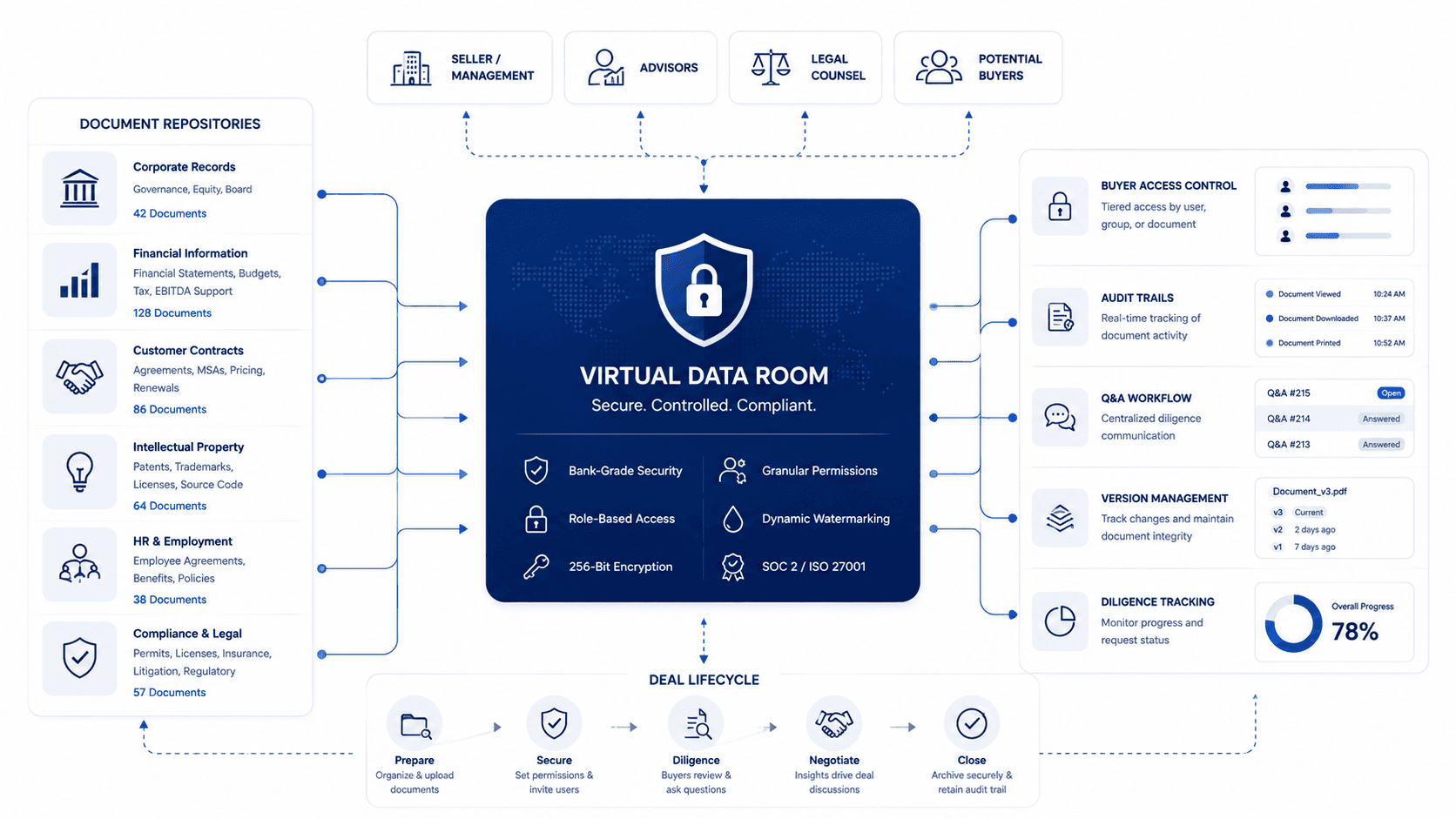
A virtual data room (VDR) is a secure, cloud-based document repository used to store and share confidential business records during M&A transactions, due diligence, fundraising, and IPO preparation. VDRs give multiple authorized parties — — buyers, advisors, legal counsel — — controlled access to sensitive documents under strict permission tiers, audit trails, and watermarking.
A virtual data room (VDR) is a highly secure, cloud-based repository designed for hosting, managing, and distributing confidential documentation during sensitive financial transactions.
Boutique M&A advisors, corporate finance teams, and buyers utilize virtual data rooms to secure operations, speed up due diligence timelines, and reduce transaction friction. To understand how a boutique M&A advisor workflow integrates VDR management from initial diagnostic through closing, see our full advisor role and process guide. Core capabilities of a secure VDR include:
- Granular User Permissions: Restricting document access down to folder, file, and role levels.
- Dynamic Document Watermarking: Automatically applying viewer email, IP, and time stamps to prevent leaks.
- Integrated Q&A Moderation: Standardizing buyer question submission and advisory answers within the platform.
- Tamper-proof Audit Trails: Generating comprehensive transaction logs to protect sellers in post-close disputes.
Looking to calculate financial metrics? If you are actively preparing for diligence, you can estimate your firm's weighted average cost of capital using our free WACC calculator, quantify strategic buyer premiums with the Synergy & Premium Estimator, or calculate target valuation targets using the working capital peg calculator to ensure clean financial tracking in the VDR.
Why the Definition of a "Virtual Data Room" Has Expanded Significantly in 2026
Most explanations of virtual data rooms focus on what they replace: the physical data room, where authorized buyers would travel to a law firm's conference room, review binders of confidential documents under supervision, and leave without taking copies. That framing is accurate as far as it goes, but it undersells what modern VDR platforms actually do in practice.
A virtual data room today is less a digital filing cabinet and more a transaction control center. Beyond document storage and access management, a well-configured VDR in 2026 tracks which buyers have viewed which documents, generates time-stamped audit trails that protect the seller in post-closing disputes, manages the Q&A process between buyer teams and management, controls document version updates without disrupting active buyer access, and integrates with the advisor's broader workflow tooling.
The shift matters for advisors because buyers — particularly private equity firms and strategic acquirers running parallel diligence workstreams — now evaluate the quality of the VDR itself as a proxy for operational sophistication. In our experience working across lower-middle-market sell-side processes, a poorly organized data room does not just slow down diligence.
It signals to the buyer's team that the business may be equally disorganized operationally, which creates psychological leverage for purchase price renegotiation before a single financial finding has been documented.
That's the real issue. The VDR is not administrative infrastructure. It is your first negotiating position. To ensure your digital document room is fully prepared before launching your process, review our comprehensive VDR preparation guide to structure your directories correctly.
What Separates a Real VDR from Generic Cloud Storage
Before exploring how VDRs work in M&A transactions, it is worth being explicit about what they are not. SharePoint, Google Drive, and Dropbox are file synchronization and sharing tools designed for internal collaboration.
They are not built for multi-party transaction environments, and their use in due diligence creates several structural problems:
No role-based access tiering — you cannot easily grant one buyer group access to financial summaries while restricting a competing buyer from seeing customer pricing schedules in the same folder structure.
No document-level audit trails with viewer identification — you cannot prove after the fact which individual from the buyer's team viewed which document at what time, which matters enormously in representations and warranties insurance claims.
No integrated Q&A management — buyer questions arrive via email, creating fragmented communication threads across multiple advisors and attorneys.
No dynamic watermarking — documents downloaded from standard cloud platforms carry no identification of who accessed them.
For transactions below $5M in enterprise value, the limitations of generic cloud storage may be acceptable. For anything above that threshold, the operational and legal risks of running diligence without a purpose-built VDR are material.
Case Studies: The $3M Difference Between a Good VDR Setup and a Bad One
Case Study: When the Data Room Became the Problem
In one sell-side process we are aware of involving a Southeast professional services firm, the advisory team decided to use a shared Google Drive folder as their data room, primarily to avoid the monthly cost of a purpose-built VDR platform. The logic seemed sound during the early marketing phase — the folder structure was clean, and document permissions were manually managed at the file level.
The problems emerged when four buyer groups entered simultaneous diligence. Two buyers could see a customer schedule that should have been restricted to clean-team counsel only.
One buyer's associate accidentally accessed a version of the EBITDA normalization model that contained an internal commentary note questioning the durability of the largest customer relationship. That note was not intended for external circulation.
By the time the advisory team discovered the access errors and corrected them, the damage had been done. Both affected buyers adjusted their preliminary valuation thinking based on what they had seen.
The deal ultimately closed at a meaningfully lower enterprise value than the advisor's initial process expectations, and the firm spent considerable time and legal fees addressing the inadvertent disclosure in the definitive purchase agreement's representations and warranties section.
The cost of the VDR platform they avoided was a rounding error compared to the outcome.
How It Should Be Done: Pre-Packaged, Tiered, and Launched Clean
A contrasting example from a manufacturing business in the Mid-Atlantic region illustrates what a disciplined VDR setup produces. The advisor began building the data room four months before the first buyer NDA was executed.
Documents were organized into a five-tier folder hierarchy aligned with standard buy-side diligence frameworks. Tier 1 opened to all NDA signatories with financial summaries and high-level operational materials.
Tier 2 released only to buyers who had submitted an acceptable indication of interest. Tier 3, containing detailed customer contracts and personnel compensation, was accessible only post-LOI and only through a separate clean-team folder structure.
When the process launched, the buyer group that ultimately transacted completed their financial review ahead of their projected timeline. The advisor attributed this to one specific factor: every document the buyer requested — including a pre-calculated working capital model mapped using a working capital peg calculator — was where they expected it to be, formatted the way they expected to find it, with no gaps that required explanation.
The process moved quickly, the seller retained negotiating leverage throughout, and the transaction closed with no post-signing disputes over document representations. Advisors can achieve this level of transaction speed by auditing their clients' documentation using a structured VDR due diligence checklist early in the pre-launch phase.
What We Actually See In Deals: Across sell-side processes in the lower-middle market, the most damaging VDR failures are rarely about missing documents. More often, documents exist but are stored across personal email, shared drives, and legacy file servers with no single point of truth. The advisor discovers the gap only when the buyer asks for something that cannot be located within the same business day — at which point the buyer's confidence has already shifted.
How a Virtual Data Room Works: A Step-by-Step Breakdown for Advisors
Phase 1: Platform Setup and Initial Configuration
Before a single document is uploaded, the VDR platform needs to be configured to match the transaction structure. This involves establishing the primary administrator account (typically the lead advisor), creating sub-administrator roles for co-advisors and outside legal counsel, and defining the initial folder taxonomy.
The folder taxonomy is not a detail to be figured out after launch. Standard practice in the lower-middle market organizes documents into eight to ten top-level categories: corporate governance, financial records (where you will store historical statements and cost of capital models, which can be verified using our online WACC calculator), tax compliance, customer and revenue, operations and technology, intellectual property, human resources, insurance and risk, regulatory and compliance, and deal-specific materials.
Each category expands into subcategories with naming conventions that match how buy-side diligence teams organize their own workpapers.
Get the taxonomy wrong and buyers have to work harder to find what they need. That friction adds up.
Phase 2: Document Population and Access Control Staging
With the folder structure in place, the document upload process begins in parallel with tiered access configuration. The critical discipline here is populating Tier 1 — the materials that will be visible to all NDA signatories from day one — completely before the VDR goes live.
Many advisory teams make the mistake of launching with a partially populated Tier 1, intending to add documents as they are assembled. This approach signals to buyers that the seller is not prepared, and sophisticated buyer teams track VDR activity closely during early access.
A data room that shows thirty new uploads in the first week of buyer access is a data room that was not ready to launch.
⚠️ Common Mistake: Enabling full download permissions for all documents at launch. High-sensitivity documents — IP registrations, customer pricing schedules, key employee compensation — should be view-only with dynamic watermarking enabled from the start. Download permissions can be expanded for specific documents as the process advances to confirmatory diligence.
Phase 3: Buyer Access Management and Q&A Moderation
Once buyers begin accessing the VDR, the advisor's role shifts from document curator to access manager and Q&A moderator. Most VDR platforms include a built-in question submission and response workflow.
This is not optional infrastructure — it is critical.
When buyer questions are answered through the VDR's Q&A module, every question and answer becomes part of the transaction's official record. This matters in two ways.
First, it ensures that all buyer groups receive the same information, reducing the risk of disparate treatment claims. Second, it creates an audit trail that can be referenced in representations and warranties insurance underwriting and, in some cases, post-closing litigation.
Advisors who allow buyers to bypass the Q&A module and send questions directly via email create fragmented documentation and expose the seller to information asymmetry claims.
Phase 4: Document Version Management and Diligence Tracking
As confirmatory diligence progresses, documents are frequently updated. Revised financial statements are issued after audit adjustments (often calculated using an EBITDA normalization calculator to show true operational earnings).
Customer contracts are redacted to remove pricing details. Tax returns are supplemented with amended filings.
A purpose-built VDR handles version updates by archiving previous versions and notifying relevant buyer groups of the update without disrupting their current access. Generic cloud platforms typically overwrite documents on upload, eliminating the version history that can be relevant in post-closing disputes.
Track which documents have been requested, which have been delivered, and which are still outstanding using the VDR's built-in diligence tracking. Most platforms generate a request status report that the advisory team can use in weekly management calls to maintain process momentum.
Physical Data Room vs Virtual Data Room: A Direct Comparison
Physical Data Room
- Access: Buyers travel to a physical location, often a law firm or bank office
- Hours: Restricted to business hours, typically scheduled in advance with supervision
- Document control: Buyers cannot remove physical copies; handwritten notes only
- Multi-buyer coordination: Sequential access — one buyer group at a time
- Audit trail: Manual sign-in logs; limited document-level tracking
- Cost: Significant for long processes — facility fees, supervision costs, buyer travel
- Timeline impact: Extends diligence timelines by requiring scheduled visits
Virtual Data Room
- Access: Buyers access from any location with an internet connection, at any time
- Hours: 24/7 access enables global buyer groups across time zones
- Document control: Granular permissions — view-only, download, print restrictions at document level
- Multi-buyer coordination: Simultaneous access for multiple buyer groups with siloed permissions
- Audit trail: Automated, timestamped logs of every document view, download, and Q&A interaction
- Cost: Monthly platform subscription; typically far lower than physical room logistics
- Timeline impact: Enables parallel diligence workstreams that compress overall process timelines
The physical data room is essentially obsolete in lower-middle-market M&A. It is occasionally still used in highly sensitive transactions where the seller's counsel wants to prevent any electronic document transmission, but this is rare and typically limited to transactions involving classified government contracts or highly regulated financial institutions.
How AIVI Extends Your VDR Workflow Beyond Document Storage
A virtual data room solves the document access and security problem. What it does not solve is the workflow problem that comes before it: identifying which documents need remediation before the VDR launches, tracking remediation progress with the client, and ensuring that the documents that eventually populate the VDR actually support the financial and operational claims in the CIM.
Advisory teams using the VDR remediation workflow at AIVI address this pre-launch gap systematically. When a client completes the exit readiness diagnostic, the platform generates a structured list of document gaps organized by diligence category — the same categories that will ultimately become the VDR's folder structure.
Each gap becomes an assigned task on the remediation Kanban, visible to both the advisor and the client, with a target completion date tied to the projected VDR launch window.
This integration matters because the two biggest sources of VDR problems — documents that are missing and documents that contradict the CIM — are both detectable before the first buyer logs in. The automated CIM generation feature ensures that the financial figures and operational claims in the marketing package are drawn from the same diagnostic data that drives the VDR preparation checklist, eliminating the CIM-to-VDR discrepancy that buyers use to renegotiate price.
Frequently Asked Questions
What is a virtual data room used for in M&A?
A virtual data room in M&A is a secure online platform where a seller's advisory team stores, organizes, and shares confidential documents with prospective buyers during the due diligence process. It replaces the traditional physical data room and provides role-based access controls, document-level audit trails, Q&A management, and version tracking.
VDRs are used in sell-side M&A, buy-side acquisitions, IPO preparation, private equity fundraising, and commercial real estate transactions.
How is a virtual data room different from Google Drive or SharePoint?
Google Drive, SharePoint, and Dropbox are general-purpose file sharing tools designed for internal team collaboration. They lack the role-based access tiering, document-level audit trails, dynamic watermarking, Q&A workflow modules, and regulatory compliance features required for M&A due diligence.
Using general-purpose cloud storage for a confidential transaction creates legal and information security risks that purpose-built VDR platforms are specifically engineered to prevent. When considering transaction budgets, reviewing structured pricing plans for dedicated secure spaces is a critical insurance policy compared to using a free but insecure cloud folder.
When should sellers set up their virtual data room?
Sellers should begin configuring their VDR and populating documents at minimum three to four months before the target process launch date. Starting this early provides enough time to identify and remediate document gaps, formalize any contracts that have been operating informally, and ensure that the financial records in the VDR align with the figures presented in the CIM.
Advisors who launch the VDR within weeks of the first buyer NDA consistently report longer diligence timelines and more buyer-initiated renegotiation.
Who controls access in a virtual data room?
The sell-side advisory firm typically controls all VDR access as the primary administrator. Access is structured in tiers based on buyer stage in the process: early-stage NDA signatories receive limited financial summaries, buyers who have submitted acceptable indications of interest receive broader financial and operational data, and buyers under LOI receive full confirmatory diligence access including detailed customer and personnel records.
Outside legal counsel for both parties is typically given separate clean-team folder access restricted to sensitive legal and IP documents.
What happens to the virtual data room after the deal closes?
After closing, the VDR serves as the definitive archive of the transaction's document record. Most platforms allow the administrator to export the full document set and audit trail to a static archive.
This archive is maintained by both the buyer's and seller's legal counsel as evidence of what documents were disclosed during diligence, which is relevant for representations and warranties claims, indemnification disputes, and regulatory review in the years following the transaction. Standard practice is to retain the archive for at least five to seven years post-closing.
Disclaimer: The financial and legal information provided in this article does not, and is not intended to, constitute professional legal or financial advice; instead, all information, content, and materials available on this site are for general informational purposes only. Readers should contact their legal counsel or certified public accountant to obtain advice with respect to any particular transaction or regulatory matter.
Ready to automate M&A drafting & secure transaction readiness?
AIVI empowers boutique M&A firms and investment banks to generate CIMs, conduct instant VDR gap checks, and manage exit readiness automatically from a unified data model.